Maintaining a healthy follower-to-following ratio is vital for establishing authority on Instagram. IGAutomate's Bulk Unfollow feature helps you perform a smart, automated cleanup of your profile.
With this tool, you can quickly remove ghost accounts, non-followers, or inactive profiles safely, without any risk of action blocks, thanks to our advanced human interaction simulation engine.
-
STEP 1
Configuration and Whitelist Filters
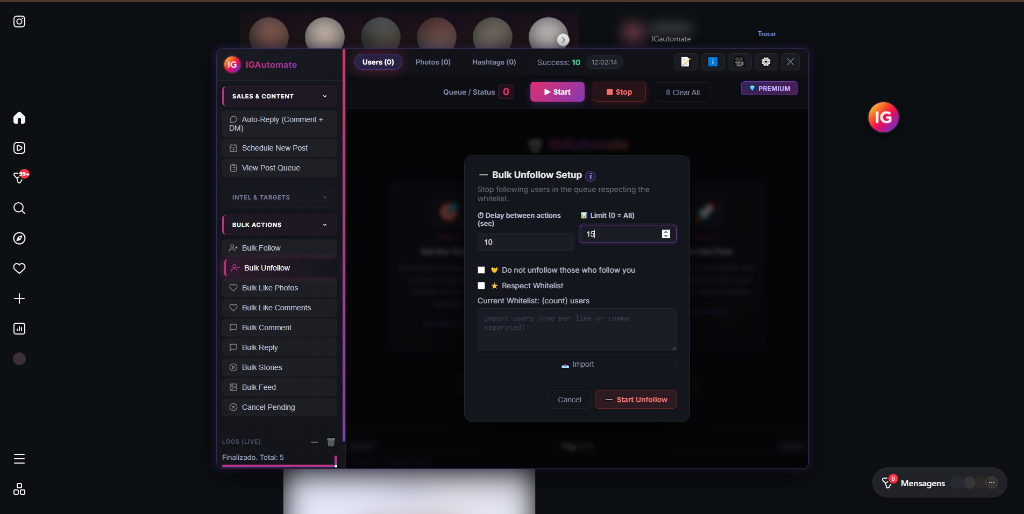
Open the IGAutomate dashboard, go to "Bulk Unfollow" under Bulk Actions. Set secure delays (we recommend 10 to 15 seconds) and enable Respect Whitelist. You can import accounts you NEVER want to unfollow (friends, VIPs, partners).
-
STEP 2
Human-like Clicks and Natural Delays
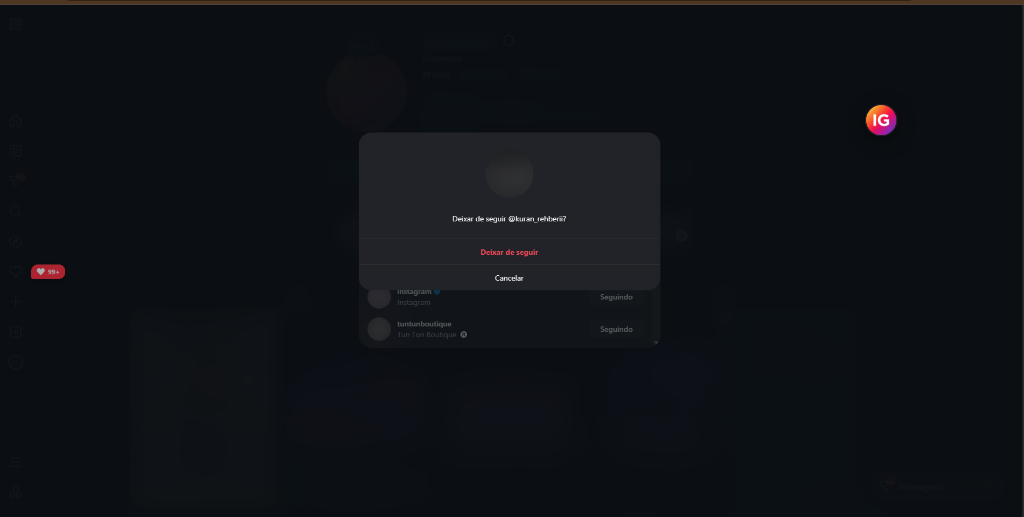
The automated engine automatically triggers the native Instagram confirmation popup. It simulates natural clicks with random delays, making the action completely organic and safe from the platform's detection systems.
-
STEP 3
Real-time Logs and Dashboard
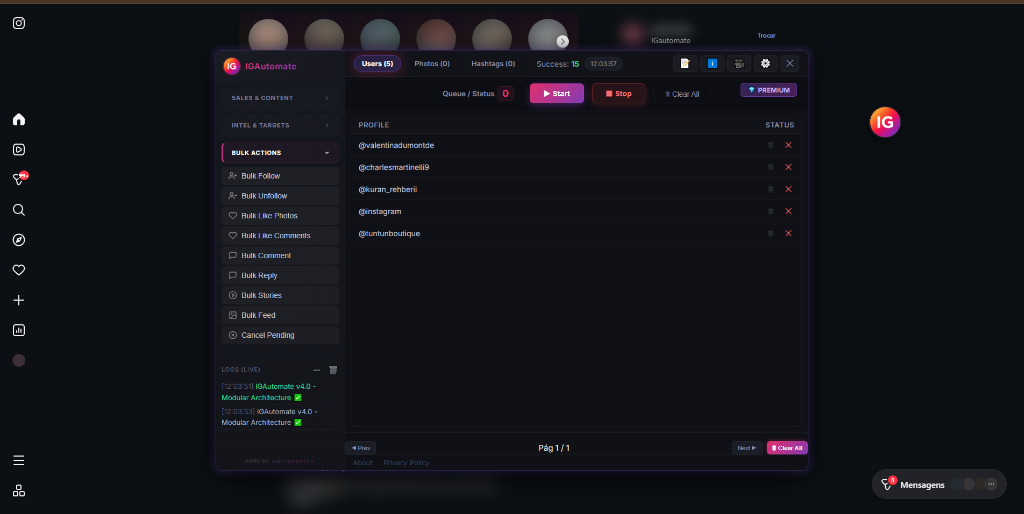
Track your cleaning process in real-time under the "Users" tab. The integrated logs display processed accounts, operation success indicators, and direct stats to ensure your profile is fully optimized.
Why is the Whitelist your most critical safety feature?
When cleaning up your profile in batches, the biggest issue with simple tools is accidentally unfollowing friends, celebrities you admire, or key business partners. IGAutomate prevents this completely.
The Respect Whitelist flag and the "Do not unfollow those who follow you" checkbox guarantee that only irrelevant or one-way profiles are unfollowed, keeping your important connections safe and intact.
Expert Tip: Set the cleanup to run in the background while you work. A moderate daily limit (such as 100 to 150 unfollows spread naturally throughout the day) remains completely invisible to the Instagram algorithm.
Best practices for account health:
- Recommended Delays: Set the delay between actions to 10 to 15 seconds. This tempo perfectly matches human behavior.
- Easy Import: Add special handles to the exception list by separating them with commas or one per line for immediate protection.
- Consistent Cleanup: Instead of unfollowing 1,000 users at once and triggering rate limits, do small daily batches of 100 accounts.
Safety Comparison: IGAutomate vs. Cloud Alternatives
| Feature |
IGAutomate (Chrome Extension) |
Cloud-based Bots (Needs Password) |
| Password Sharing |
No (Uses your own active Chrome session) |
Yes (High risk of password theft and blocks) |
| Execution IP |
Your own safe, residential IP |
Flagged cloud data center IPs |
| Accidental Unfollow Shield |
Advanced Whitelist + Follow-back Check |
Rarely support Whitelist configurations |
| Native UI Interaction |
Yes (Uses native popups for maximum safety) |
No (Forces direct, insecure API requests) |
Ready to optimize your feed and clean up your profile?
Don't waste hours clicking profiles manually. Let IGAutomate's secure local intelligence handle the hard work for you.
100% Local
No passwords or APIs
Whitelist
Protect your VIP contacts
36 Hours
Full Free Trial Access
 Português
 English
 Español
 Indonesia
 Deutsch
 Français
 हिन्दी
 فارسی
فارسی